GCADF5C: NFC multicache by trancer96
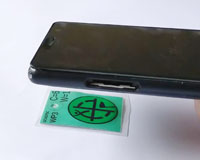
Each waypoint of the multicache has an NFC tag attached to a seat somewhere. If you have a phone that has NFC support, you just touch the back of your phone to the tag and some magic happens. Once you've done that at all 4 waypoints you get to see the final coords of the cache. How does that work? If you don't care and just want the magic to happen then head off to WP1 and give it a go. If you want to know what's happening then read on.
It stands for Near Field Communication [wikipedia] and is a relatively new technology based on the slightly older RFID [Wikipedia]. The latter is commonly used for things like passive security access tags whrereas NFC is more protocol driven and allows better 2-way communication. It is a standard that is now implemented on many (but, by no means all) modern smart phones.
One of the most important features of NFC tags is that they are passive. They don't need a battery or any internal power supply of their own - instead they receive energy from a "reader" which generates an electromagnetic field that induces current in the tag's antenna - not unlike the way a transformer sends power between windings with magnetic fields.
In the "near field" (less than one wavelength of the radiation) this coupling is quite strong which is why the technology is specfically "near field" communication as opposed to radio communication which is very much "far field". However NFC operates at 13.56 MHz which has a wavelength of 22 metres. So it's not just less than one wavelength, it's a tiny fraction of one wavelength. The strength of the electromagnetic fields diminishes extremely rapidly with distance which is why they only work when the tag is basically touching the reader and not even a few centimetres away.
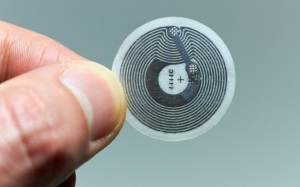
If you have a modern phone that's not an entry level model then, probably.
You will have to look up you're phone's specs if you don't know. If you google "does my phone have nfc?" you will find various things to look for in the phone's settings that indicate if it is supported.
If you're a Wellington region resident you probably have a Snapper card to use the public transport system. If your phone has NFC you can use it to read your card balance and even top it up using the Snapper smartphone app. A very practical application of NFC if ever there was one. If you can do that, you're all good.
The short version is that you should just be able to "scan" each of the four tags and your web browser will magically tell you where the cache is. How does it do that? The tech savvy may be interested in the technical explanation that follows.
There are actually quite a few ways that data can be encoded on an NFC tag which can trigger all manner of functions on a smartphone. What your phone does when it identifies the encoding scheme usually depends on what apps you've got installed that understand certain formats. The one used for this multicache is deliberately very generic to ensure the best chance of it working on a standard phone without any special software. If your phone has NFC at all it will very likely react to URL encoding and send your web browser to a web site stored in the tag. That is what will happen here.
You will need access to the Internet for this to work. There are ways to store data on the tag that can be used directly by the phone without getting the Internet involved but that would require some specialized app installed to process it. We're not doing that.
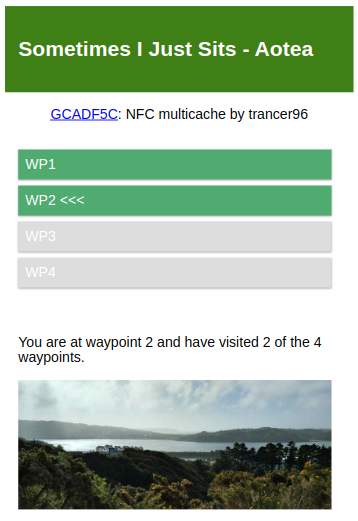
The URLs will be of the form http://gc.trancer96.nz/GCADF5C/wp. You can go there now if you want and see what happens. You should see the skeleton version of the page you would see in the field. It only shows the additional details when the url on the tag provides some additional keywords specific to that tag.
Each page will have a short confirmation that the right thing happened and one of the four waypoints should change from grey to green. The javascript will give your browser a 24-hour cookie that will be used to remember which waypoints you have visited. The web server is not involved in that at all. Once you visit the 4th waypoint, all 4 waypoints should be shown green indicating that the cookie is keeping track of what you visited. If you scan the 2nd waypoint and it's only showing you having visited that waypoint and not the first one then, in all liklihood, the cookie is being blocked and you have to revert to the manual method described on the web page.
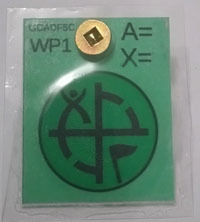
Like the picture on the right
The circular area with the geocaching logo is where the actual tag is underneath. That's what you're aligning with although the positioning is not that critical.
Once you have physically found the tag you should only need to touch the back of your phone onto the tag. You do not need to be running a special app but the phone probably needs to be awake (it might work from standby). Whether NFC is enabed by default on your phone and whether you personally have it enabled is all very case-dependent. Reacting to URL tags by opening them in a web browser should be part of the baseline implementation of NFC on a smartphone.
While tracking with a cookie sounds pretty nefarious since we hear about companies doing that with varying degrees of privacy violation, this is about as simple as a tracking cookie can get. The web server doesn't even really know about the cookie at all - it's all handled in the Javascript which is local to your web browser. The browser sends the cookie to the server when it fetches the HTML as is the cookie protocol but there is nothing on the web server to process it. It isn't necessary for this.
The way it works is that the tag provdes a keyword in the URL when you scan it. The javascript just adds that keyword to the cookie which is nothing more than a comma-separated list of those keywords. The javascript then just looks at what keywords are in your cookie so far and highlights the corresponding waypoints. Once you have 4 such keywords the javascript fetches the coords from the server (no they're not in the javascript waiting for you to peek at) and unhides the part of the HTML required to show it.
The cookie is set to expire in 24 hours so if you do part of the multi on one day but don't finish it until another day then it will have forgotten where you're up to. The 24 hours is arbitrary but why keep cookies hanging around longer than necessary?
Since we like to peek behind the curtain to see if there is any cheating to be had, the keywords sent by the tags do not appear in the javascript or html. So how does it match up the tag with the waypoint highlighting mechanism? Hashing [Wikipedia]. Just like password storage (mostly). The versions of the keywords in the javascript are hashed versions of the keywords so the javascript just hashes the keyword it gets from the tag and tries to match it against the hashes it has for the 4 tags. It's not uncrackable but we're talking about a geocache here, not your credit card details. It's only to prevent casual cheating.
It doesn't have to be, to be clear. This mainly arose from a confluence of hobbies. Playing around with "toys" like NFC tags was just a technology experiment to see how they work and what they can do. Geocaching is a given in this context. The web server side as a critical assistance to this design comes from a different interest of writing web interfaces as front ends for embedded systems - although there is no server side code or any embedded system in this case. It was more a case of "how can I solve this in the web browser?"
So there you go; WAY more information that any geocache needs and hopefully the pertinent points made it to the main cache page without anything in here being necessary to know.